
Overview

Alienware Laptop Repair

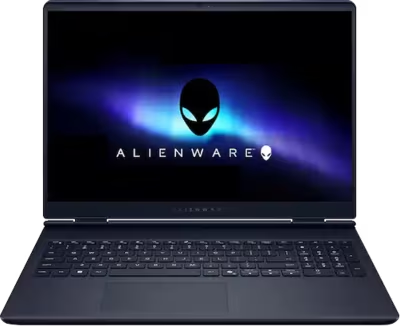
Alienware Area-51 laptops are desktop-replacement machines built around Intel Core Ultra 9 processors and NVIDIA RTX 50-series GPUs. The Area-51 18 ships with a 360W proprietary power adapter — well beyond what any USB-C standard can sustain — reflecting the level of sustained power draw these machines are designed to handle under full CPU and GPU load. That power budget, combined with a high-density board layout and large chassis, creates a specific set of failure patterns that differ from standard gaming laptops. Brentworth handles Alienware mail-in repairs nationwide with a diagnosis-first approach.

Higher-tier GPU configurations include Thunderbolt 5 ports; lower configurations use Thunderbolt 4. The proprietary 360W barrel connector is the primary charging interface, and its mechanical reliability over time is one of the more common hardware concerns on these machines. Charging circuit faults can leave the machine unresponsive quickly once the battery drains if the connection has been intermittent.

The mail-in process starts with the intake form. Describe the Alienware model, what the machine is doing or not doing, and any events that preceded the fault. Once the machine arrives it is assessed against your description, the fault is confirmed, and you receive a clear recommendation before any chargeable work begins. Packaging instructions are provided with your intake reference — Area-51 machines are large and require careful preparation for transit.

Ready to start?

Use the intake form to describe the device, the fault, and the result you want. The more specific you are, the easier it is to give you a useful answer.

Start Repair
Models we repair

Choose your model

Select your Alienware model for fault-specific information and repair details.

Common Issues

What we fix

Overheating and thermal shutdown under sustained load

Area-51 machines run Intel Core Ultra 9 processors and high-wattage RTX 50-series GPUs simultaneously under full gaming load, generating significant heat across a densely packed board. Machines that shut down during sustained gaming sessions, throttle heavily despite the cooling system running at speed, or run noticeably hotter than they did at launch may have degraded thermal interface material on the CPU or GPU dies, blocked heatsink fin stacks, or fan issues. Thermal service is the appropriate starting point before any board-level investigation.

GPU faults and display output issues

RTX 50-series GPUs in the Area-51 operate under sustained thermal and electrical stress at high power envelopes. GPU faults present as no display output on the built-in screen or an external monitor, artifacting or corruption during 3D workloads, crashes or blue screens during gaming that do not occur at desktop, or a display that goes black under load and recovers at idle. Power delivery faults on the board can produce symptoms that resemble GPU failure. Diagnosis is needed to separate the two before any parts are sourced.

Proprietary 360W charging connector and power delivery faults

The Area-51 uses a proprietary barrel connector paired with a 360W power adapter — the sustained power draw of these machines under full load exceeds what USB-C can deliver. The barrel connector is subject to mechanical wear from repeated connection cycles and can develop internal play, intermittent contact, or fail to seat reliably over time. A machine that only charges at a specific cable angle, shows no charging activity despite a known-good adapter, or powers on from mains but shows no charge activity needs inspection of the connector and the charging circuit.

Liquid damage and keyboard spills

The Area-51 keyboard with per-key AlienFX RGB sits above a densely populated board area. Liquid that reaches the board through the keyboard or chassis vents can cause key failures, trackpad loss, AlienFX controller faults, GPU instability, random shutdowns, or a complete no-power condition as corrosion develops over time. Brentworth uses ultrasonic cleaning to remove liquid and corrosion residue before any board assessment is performed.

No power and failure to boot

An Area-51 that shows no response to the power button, powers on briefly before shutting off, or stalls during POST may be dealing with a charging circuit fault, a battery issue, a failed board component, or a secondary fault caused by sustained thermal stress over time. The 360W power delivery path places significant demands on board-level power components, and faults in that path can present similarly to a dead battery or a failed power button. Diagnosis determines the root cause before any parts are ordered.

Display faults

Panel faults can develop from impact, pressure damage, or internal board issues independent of the GPU. A display that flickers, shows dead zones or backlight loss, or produces no image while the machine is otherwise running requires inspection to determine whether the fault is in the panel, the display cable, the eDP connector, or the board-level display output path. Connecting an external monitor via HDMI 2.1 or Thunderbolt first can help isolate whether the fault is limited to the internal display.

Common Questions

Frequently asked questions

Which Alienware models does Brentworth repair?

Brentworth accepts mail-in repairs for the Alienware Area-51 16 and Area-51 18, along with other Alienware gaming laptop models. If you are unsure whether your specific model or fault is a realistic repair candidate, the intake form is the right place to describe the situation and find out.

My Alienware Area-51 shuts down during gaming. Is that a thermal fault?

Thermal shutdown during sustained gaming is one of the most common Area-51 mail-in cases at Brentworth. These machines run Intel Core Ultra 9 processors and RTX 50-series GPUs at high sustained power, and when thermal interface material degrades or fin stacks become blocked, the machine will hit thermal limits and shut down protectively. Thermal service is the appropriate starting point. If it does not resolve the issue, board-level diagnosis is the next step.

My Alienware 360W charging connector is loose or only works at a specific angle. What does that mean?

A proprietary barrel connector that requires the cable to be positioned in a specific way to charge is showing mechanical wear. The internal contact surfaces have likely developed play, and the solder joints attaching the connector to the board may be stressed. This fault tends to worsen with continued use and can eventually damage the charging circuit. Describe what you are seeing in the intake form.

Is there an inspection fee for Alienware repair?

Yes. Brentworth charges a non-refundable inspection fee of $70 for Alienware laptop repairs that require disassembly to diagnose. This fee is credited toward the repair cost if you choose to proceed. If you decide not to proceed, you receive a detailed written breakdown of the fault and what remediation would be required.

My Alienware shows no display output on the built-in screen or an external monitor. What does that mean?

No output on both the internal display and an external monitor most commonly points to a GPU fault, a board-level failure in the display output path, or a power delivery problem preventing the GPU from initialising. Try connecting an external monitor via the HDMI 2.1 port or a Thunderbolt port first — if that produces an image, the fault is isolated to the internal display assembly or cable. If neither works, the machine needs board-level diagnosis.

Can you repair liquid-damaged Alienware laptops?

Many liquid-damaged Alienware laptops are recoverable depending on what the liquid reached and whether the machine has been repeatedly powered on since the spill. Brentworth cleans with ultrasonic equipment and assesses board condition before producing any quote. If the damage makes repair uneconomical, that is communicated clearly before any work is approved.

The Alienware Area-51 is a very large and heavy machine. How should I package it for shipping?

Packaging instructions are included with your intake reference number once you submit the form. For Area-51 machines in particular — which are large and heavy — double-boxing with adequate foam or bubble wrap around the chassis is strongly recommended. Remove the power brick and ship it separately. Do not use the original retail box alone, as it is not designed for repeated transit. If you have questions about packaging before you submit the intake form, note it in the form description.

How long does Alienware laptop repair typically take?

Thermal service on an Area-51 typically takes longer than on a standard gaming laptop due to the complexity of the vapor chamber disassembly and reassembly. Board-level diagnosis and GPU or power delivery repairs take longer still. Once the machine arrives and the fault is confirmed, Brentworth provides a realistic timeline before any chargeable work begins. Complex repairs on high-end machines are not rushed — the work is done correctly or not at all.

Ready to start?

Use the intake form to describe the device, the fault, and the result you want. The more specific you are, the easier it is to give you a useful answer.

Start Repair

Related services

common repairs

Laptops

MacBook and Windows laptop repair for no power, USB-C charging faults, liquid damage, broken screens, hinge damage, and overheating.

View all services