
Overview

Retro Nintendo Console Repair

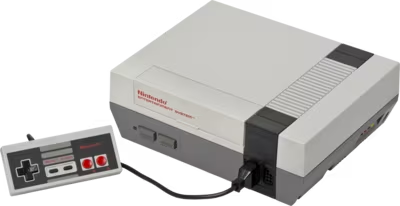
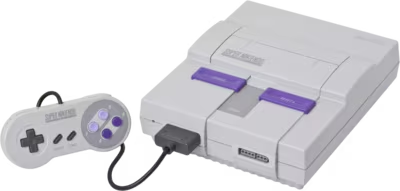
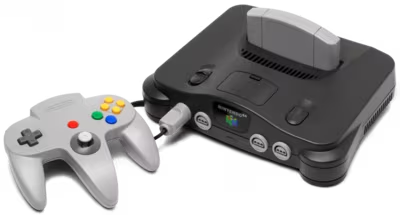
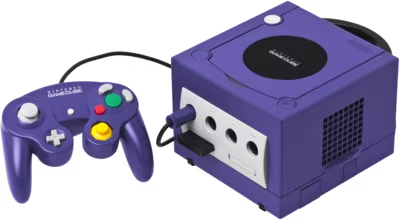
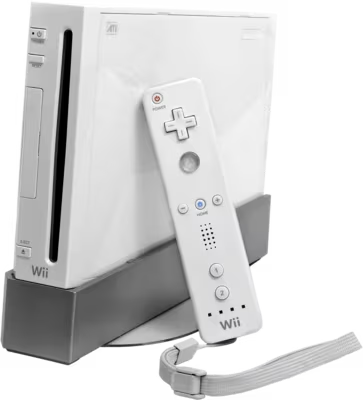
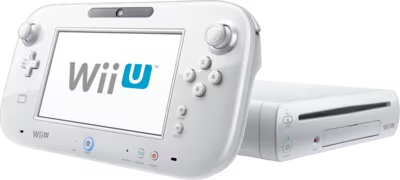
Retro Nintendo console repair at Brentworth covers the mainline home consoles Nintendo produced from 1985 through to the Wii U era — the NES, SNES, Nintendo 64, GameCube, Wii, and Wii U. Each console represents a distinct hardware generation with its own failure profile, and the age range spans four decades, meaning the challenges on each platform are very different.

Cartridge-based consoles — the NES, SNES, and N64 — are now between 25 and 40 years old. Their most common issues are mechanical and connector-related: worn cartridge slots, degraded edge connectors, and in the SNES's case, capacitor leakage on certain board revisions. The GameCube, Wii, and Wii U are optical disc platforms where ageing disc laser assemblies are the dominant fault category, alongside capacitor degradation on the oldest units.

Brentworth handles both repair and modification work on retro Nintendo hardware — including ODE (optical disc emulator) installations that allow disc-free play from SD card or USB, and HDMI output mods for consoles that originally output composite, S-Video, or component signals. Describe the console, the fault or modification required, and any relevant history in the intake form.

Ready to start?

Use the intake form to describe the device, the fault, and the result you want. The more specific you are, the easier it is to give you a useful answer.

Start Repair
Models we repair

Choose your model

Select your Nintendo console for fault-specific repair and modding information.

Common Issues

What we fix

Cartridge slot wear and poor contact on NES, SNES, and N64

The NES 72-pin connector is the most well-known cartridge fault in retro gaming — years of cartridge insertions wear the pin contacts to the point where the console fails to read games or produces graphical corruption. Replacement connectors are available and this is a common and straightforward repair. The SNES and N64 use edge connector designs that are more durable but still subject to oxidation and mechanical wear after decades of use. Cleaning with isopropyl alcohol restores contact in many cases; worn connectors require replacement.

Disc drive laser failure on GameCube, Wii, and Wii U

Optical disc drive failures are the dominant fault on Nintendo's disc-based consoles. The GameCube disc drive laser is particularly prone to failure from age — many drives are now over 20 years old. The Wii and Wii U use different drive mechanisms but exhibit the same progressive failure pattern: games that load inconsistently, fail to read at all, or require multiple attempts before spinning up correctly. Disc drive repair involves laser potentiometer adjustment in mild cases and laser or full drive replacement for severe failures.

Capacitor leakage and degradation

Electrolytic capacitors on retro Nintendo hardware degrade with age, particularly on consoles manufactured in the late 1980s and 1990s. The SNES 1-CHIP board revision is especially susceptible to capacitor leakage from the small surface-mount electrolytic capacitors near the audio and video circuits — leaking capacitor fluid causes PCB trace corrosion if left unaddressed. The GameCube and Wii U GamePad also have capacitor ageing concerns on older units. A full recapping service replaces aged capacitors with modern equivalents before failure occurs.

GamePad battery degradation on Wii U

The Wii U GamePad uses a proprietary lithium battery that is now over a decade old on all units. Batteries that no longer hold charge, drain rapidly during play, or cause the GamePad to shut off mid-session need replacement. Nintendo no longer manufactures the original battery, but compatible replacement cells are available. The GamePad's battery is more critical than on most consoles because the Wii U requires the GamePad for many functions including the main menu — a dead GamePad battery can render the console partially unusable.

Common Questions

Frequently asked questions

Do you offer HDMI mods for retro Nintendo consoles?

Yes. Brentworth installs HDMI output mods on several retro Nintendo platforms. The N64Digital and UltraHDMI mods provide direct digital HDMI output from the Nintendo 64, bypassing the original analogue output entirely. The GCVideo and GCDual mods do the same for the GameCube. The NES and SNES output RGB natively through their multi-out connectors, and an HDMI adapter or upscaler can be paired externally — internal HDMI mods are available for both platforms but require more invasive installation. Describe the console and the output method you want in the intake form.

Can you install an ODE (optical disc emulator) in a GameCube or Wii?

Yes. Brentworth installs optical disc emulators on the GameCube and Wii. The PICOBOOT and Swiss combination for the GameCube allows game loading from SD card without modifying the drive. The Wii has established homebrew solutions that allow loading from USB storage. ODE installation is particularly recommended for GameCubes where the disc drive has failed and replacement parts are increasingly scarce. Describe the console and the preferred loading method in the intake form.

My NES flashes a blinking red light and won't load games. Is it the 72-pin connector?

The blinking power LED on the NES is almost always a contact failure between the cartridge and the 72-pin connector — the console enters a reset loop when it cannot reliably read the cartridge. In many cases, cleaning the cartridge edge connector and the 72-pin pins with isopropyl alcohol restores function temporarily, but worn connectors that have cycled through thousands of insertions will not remain reliable after cleaning alone. Replacement 72-pin connectors are the definitive fix and represent one of the most common NES repairs.

What is the difference between the SNES 1-CHIP and multi-chip revisions?

The SNES was produced in multiple board revisions throughout its production run. The 1-CHIP revisions (1CHIP-01, 1CHIP-02, 1CHIP-03) consolidate several chips onto a single S-PPU2 package and are known for producing a sharper, brighter video signal than the earlier multi-chip boards. The 1-CHIP boards are also the revisions most susceptible to small electrolytic capacitor leakage near the audio and video circuits — these capacitors should be inspected and replaced as preventative maintenance. The multi-chip boards are more robust in this regard but produce a slightly softer video output.

My GameCube won't read discs. Is repair still worthwhile?

GameCube disc drive repair is often worthwhile, but the availability and cost of replacement drive mechanisms should be considered against the cost of installing an ODE. For a GameCube with a failed drive and a collection of physical discs, laser replacement or potentiometer adjustment may restore disc reading. For a GameCube used as a standalone player without a physical collection, ODE installation via PICOBOOT eliminates the drive dependency entirely and preserves the hardware long-term. Both paths are available — describe the intended use case in the intake form.

Can the Wii U GamePad be repaired if the screen is cracked?

Yes, the Wii U GamePad screen can be replaced. The GamePad uses a resistive touchscreen with an LCD panel underneath, and both components can be replaced independently or together depending on the damage. A crack that only affects the outer glass digitiser layer but leaves the LCD intact is a less expensive repair than a full assembly replacement. The GamePad's proprietary screen assembly means parts sourcing is from specialist retro suppliers rather than standard mobile part channels.

Does the Wii have backward compatibility with GameCube games?

The original Wii (RVL-001) includes GameCube hardware compatibility — four GameCube controller ports and two memory card slots are present under a cover on the top of the console, and original GameCube discs can be played natively. Later Wii revisions (the smaller Wii Family Edition and Wii Mini) removed GameCube compatibility entirely. If you have a Wii and want to confirm its GameCube compatibility, check the top panel: the presence of the controller and memory card port cover confirms the RVL-001 variant.

Ready to start?

Use the intake form to describe the device, the fault, and the result you want. The more specific you are, the easier it is to give you a useful answer.

Start Repair

Related services

specialist work

Retro Consoles

Retro repair, restoration, and mod work for older consoles with aging parts, fragile boards, and video or drive issues.

View all services