
Overview

AMD Radeon GPU Repair

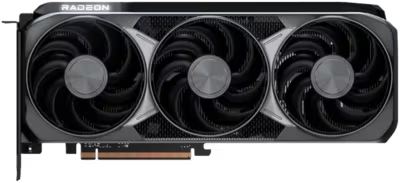
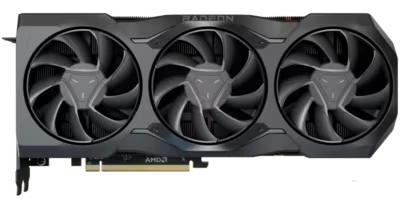
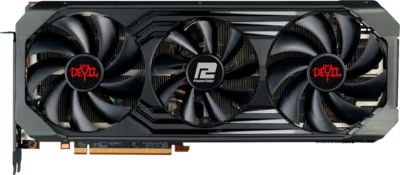
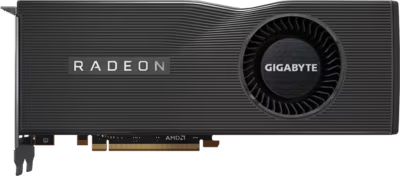
AMD Radeon GPU repair at Brentworth covers four generations of RDNA architecture — from the newest RDNA 4 RX 9000 series through RDNA 3 RX 7000, RDNA 2 RX 6000, and RDNA 1 RX 5000 cards. AMD's Radeon lineup has distinct failure characteristics compared to NVIDIA's GeForce range, and understanding those differences is essential for accurate diagnosis.

AMD Radeon cards are particularly susceptible to BIOS corruption events, which can leave a card in a state that looks like complete board failure but is often recoverable. Many AMD cards carry a dual-BIOS switch that enables recovery from a corrupted primary BIOS without hardware intervention. The RX 6000-series flagship cards developed a well-documented pattern of memory chip overheating from degraded thermal pads — similar to the GDDR6X issues seen on high-end NVIDIA RTX 30 cards, but caused by different thermal design choices. The RX 7900 XTX reference card had a documented liquid metal thermal interface issue on early production samples.

Brentworth handles AMD Radeon GPU mail-in repairs nationwide. The intake form is the starting point — describe the card, the symptoms, and any events that preceded the failure. Once received, the card is inspected and bench tested before any chargeable work is quoted.

Ready to start?

Use the intake form to describe the device, the fault, and the result you want. The more specific you are, the easier it is to give you a useful answer.

Start Repair
Models we repair

Choose your model

Select your Radeon series for fault-specific information and repair details.

Common Issues

What we fix

No display output and cards that fail to POST

An AMD Radeon card that fails to produce any display output — whether the system appears to boot normally otherwise, or nothing at all responds — can have several different root causes. BIOS corruption events are one of the more common recoverable causes on AMD cards. Physical faults in display output circuitry, PCIe communication failures, and connector damage are also common. Inspection and bench testing determine which is responsible.

BIOS corruption and dual-BIOS recovery

AMD Radeon cards are more prone to BIOS corruption events than many other GPU brands. A failed driver update, a power loss during a BIOS flash attempt, or a software conflict can leave the card unable to initialise — producing a black screen or a card that the system does not recognise. Many AMD cards have a dual-BIOS switch that allows recovery by selecting the backup BIOS chip. Cards without that switch or where both chips are affected need reflashing via hardware programmer. This is one of the more recoverable dead-card scenarios, but it requires proper tooling.

Artifacting, memory instability, and thermal-related corruption

AMD RX 6000 and 7000-series cards use GDDR6 memory with thermal pads responsible for heat transfer to both the heatsink and the backplate. Degraded, dried-out, or incorrectly installed pads allow individual memory chips to run significantly hotter than the GPU die — producing artefacts, corruption, or hard crashes under load. Thermal assessment of the full card — not just the die — is the correct starting point for AMD artifacting faults before any VRAM diagnosis is considered.

Overheating, hotspot issues, and fan failure

AMD's RDNA cooler designs are generally well-engineered, but the large reference coolers on flagship cards have many thermal pad interfaces that degrade over heat cycles. RX 7900 XTX reference cards had a documented hotspot issue on early samples related to the factory-applied liquid metal thermal interface. Fan bearing wear, blocked airflow, and degraded backplate pad contact are the more common causes of overheating on RX 6000 and 5000 series cards.

Damaged DisplayPort, HDMI, or PCIe power connectors

AMD Radeon cards use standard DisplayPort and HDMI output connectors that can sustain mechanical damage from repeated plugging cycles, cable strain, or transport. PCIe power connectors on high-end cards — particularly those requiring two 8-pin connections — can develop damage from forced insertions or poor cable management. A card where the fault is isolated to a damaged connector is often a cost-effective repair relative to the card's value.

Common Questions

Frequently asked questions

Which AMD Radeon GPU generations does Brentworth repair?

Brentworth accepts AMD Radeon mail-in repair requests across the RX 9000 (RDNA 4), RX 7000 (RDNA 3), RX 6000 (RDNA 2), and RX 5000 (RDNA) series. Radeon Pro workstation cards are also accepted. Select your series below or describe the specific model and fault in the intake form — acceptance depends on the fault type, the card's condition, and whether repair is economically viable.

My AMD card shows no display. How do I check if it is a BIOS corruption issue?

Many AMD Radeon cards have a physical dual-BIOS switch — a small two-position toggle on the PCB, often near the power connectors. Switching from the primary to the secondary position and restarting will load the backup BIOS chip. If the card comes back to life in the secondary position, the primary BIOS can be reflashed. The switch is present on most RX 6000 and 7000-series cards but absent on some lower-tier models. If your card does not have the switch, or if neither BIOS recovers it, hardware programmer access is needed. Describe what you have tried in the intake form.

Can VRAM be replaced on AMD Radeon cards?

Yes, but only when the fault is a genuine chip failure rather than a thermal problem, the rest of the board is healthy, and the card's value supports the cost of microsoldering work. On AMD RDNA 2 and 3 cards, artifacting from memory is more commonly caused by degraded thermal pads than failed chips — pad replacement resolves this at a fraction of the cost and is always assessed first. If pad replacement does not resolve the fault, VRAM diagnosis is the next step.

What are the most common AMD Radeon GPU repair faults?

Thermal pad degradation on memory chips is the most common repair presentation for RX 6000-series flagship cards — GDDR6 chips run hotter than expected when pads lose compliance, producing load-dependent artefacts and crashes. BIOS corruption is the second most common category and affects cards across all RDNA generations. Fan bearing wear, display connector damage, and PCIe power connector faults are also common. Board-level component failures are less frequent but do occur and require proper diagnosis.

Is there a diagnostic fee for AMD Radeon GPU repair?

Yes. Brentworth charges a non-refundable diagnostic fee that is credited toward the repair cost if you proceed. The fee covers bench testing, inspection, and a written assessment. For RX 6000-series GDDR6 flagship cards, the diagnostic process includes thermal pad assessment as an early step, since this resolves the majority of artifacting cases without more invasive work.

How do I pack and ship my AMD GPU safely for a mail-in repair?

Use the original box and packaging if you have it. If not, wrap the card in anti-static bubble wrap or foam and pack it in a snug cardboard box with no room for movement during transit. Double-boxing is recommended for large cards like the RX 7900 XTX or RX 6900 XT. Remove any attached power adapters or cables before packing. Include your intake reference number inside the package. Use a tracked, insured shipping service rated for the declared value of the card.

My AMD card is out of manufacturer warranty. Does that affect repair options?

No. Out-of-warranty cards are Brentworth's primary repair candidates. AMD's standard warranty is typically three years from purchase, and RX 5000 and most RX 6000-series cards are well past that. Some RX 7000 and RX 9000 series cards may still be within warranty — check AMD's or your AIB partner's warranty terms before sending a card for third-party repair if you believe it may still be covered.

Ready to start?

Use the intake form to describe the device, the fault, and the result you want. The more specific you are, the easier it is to give you a useful answer.

Start Repair

Related services

Specialist Work

GPU's

Diagnosis-first GPU repair for no display, artifacting, overheating, fan failure, and damaged connectors.

View all services