
Overview

Asus ROG Strix G Repair

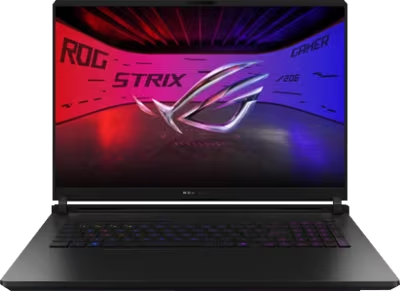
The ROG Strix G line sits between the TUF Gaming range and the flagship SCAR in Asus's gaming laptop portfolio. The Strix G16 and G18 are available with both Intel Core Ultra and AMD Ryzen configurations, paired with mid-to-high-tier RTX 50-series GPUs and ROG Nebula IPS displays. They offer solid thermal headroom while delivering sustained gaming performance across both 16-inch and 18-inch chassis sizes.

Brentworth reviews ROG Strix G mail-in repair requests for thermal throttling, GPU faults, display issues, charging connector problems, liquid damage, and board-level diagnosis across current and recent generations.

Ready to start?

Use the intake form to describe the device, the fault, and the result you want. The more specific you are, the easier it is to give you a useful answer.

Start Repair
Models we repair

Choose your model

Select your Strix G model for generation-specific fault information and repair details.

Common Issues

What we fix

Thermal throttling under gaming load

Strix G models run sustained GPU workloads at mid-to-high power levels. As thermal interface material ages and heatsink fins accumulate dust, the cooling system's efficiency drops — causing throttling under gaming load, fans running at high speed during lighter tasks, or shutdown during extended sessions. Thermal service is the appropriate starting point.

GPU faults and display output issues

GPU faults on Strix G laptops present as artifacting under 3D load, crashes during gaming, or loss of output on the internal display or an external monitor. The Mux Switch on Strix G models controls whether output routes through the integrated or discrete GPU and is part of external display output diagnosis. Intel and AMD CPU configurations handle GPU power delivery differently. Inspection establishes whether the fault is in the GPU, the display output path, or the panel.

Charging connector and power delivery

Strix G models use a proprietary barrel connector for primary charging alongside USB-C on most configurations. A connector that requires specific cable positioning, charges intermittently, or shows no charge activity with a known-good adapter needs inspection. Both the barrel connector and the USB-C charging path can develop independent faults.

IPS display faults

The ROG Nebula IPS displays used on Strix G models can develop backlight failure, dead pixel zones, or flickering from panel impact or display cable stress at the hinge. A display that shows no image, flickers at specific brightness levels, or has developed dead zones requires inspection to determine whether the fault is in the panel, the cable, or the board.

Liquid damage

Liquid that enters through the Strix G keyboard reaches the board quickly through the key gaps. The machine may function normally after a spill and then develop fan failures, USB faults, GPU instability, or random shutdowns as corrosion develops. Do not power on or charge a Strix G that has been spilled on before it has been assessed.

No power and failure to boot

A Strix G that shows no response to the power button may have a dead battery, a failed barrel or USB-C charging connector, a blown board protection component, or a board-level fault. AMD and Intel configurations can present no-power conditions differently. Diagnosis determines the root cause before any repair work is quoted.

Common Questions

Frequently asked questions

Which ROG Strix G models does Brentworth repair?

Brentworth reviews repair requests for the ROG Strix G16 and G18 in both Intel Core Ultra and AMD Ryzen configurations across current and recent generations. Describe the exact model, generation, and CPU platform in the intake form.

What distinguishes the Strix G from the Strix SCAR in terms of repair considerations?

The Strix G is configured with lower-TDP GPUs than the SCAR — typically RTX 5060 to 5070 range versus the SCAR's 5080 and 5090. This means less extreme heat output, proportionally lower stress on the power delivery circuit, and somewhat slower thermal paste degradation. The Strix G also uses IPS displays rather than the SCAR's OLED, which changes the display fault profile — IPS panels develop backlight failure and cable faults rather than pixel-level OLED faults.

My Strix G throttles or shuts down during gaming — what is the most likely cause?

Thermal degradation of the paste on the CPU and GPU is the most common cause. As thermal interface material ages, the cooling system loses contact efficiency and temperatures climb faster than the fans can compensate. A Strix G that throttles during games that previously ran smoothly, or that shuts down during extended sessions, is typically a strong candidate for thermal service. If thermal service does not resolve the fault, board-level diagnosis follows.

My Strix G won't show output on an external monitor — could the Mux Switch be the cause?

Yes, and it is the first thing to check. On Strix G models with NVIDIA Advanced Optimus, the Mux Switch determines whether display outputs route through the integrated GPU or the discrete NVIDIA GPU. If the Mux is set to iGPU mode, some external display outputs may be disabled. Set the Mux Switch to dGPU mode in Armoury Crate and test again. If the problem persists regardless of Mux position, the fault is in the port, the GPU, or the board.

Can you repair GPU faults on a Strix G?

Yes. GPU faults on Strix G hardware are reviewed at intake. Describe the symptoms clearly — artifacting under load, crashes during specific games or applications, or loss of output on internal or external displays. Note the CPU platform as this affects how the fault is diagnosed. Thermal causes are ruled out first.

Is there an inspection fee for ROG Strix G repair?

Yes. Brentworth charges a non-refundable inspection fee of $70 for Strix G repairs that require disassembly to diagnose. This is credited toward the repair cost if you choose to proceed. If you decide not to proceed, you receive a written breakdown of the fault and what remediation would be required.

Ready to start?

Use the intake form to describe the device, the fault, and the result you want. The more specific you are, the easier it is to give you a useful answer.

Start Repair

Related services

common repairs

Laptops

MacBook and Windows laptop repair for no power, USB-C charging faults, liquid damage, broken screens, hinge damage, and overheating.

View all services