
Overview

Asus ROG Zephyrus G Repair

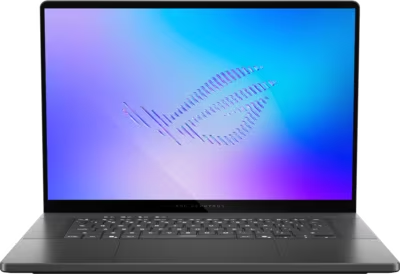
The ROG Zephyrus G line covers Asus's premium thin-and-light gaming laptops — the Zephyrus G14 and G16. These machines prioritise portability alongside high gaming performance, using ROG Nebula HDR OLED displays in slim chassis that push the thermal design closer to its limits than the larger Strix models. The Zephyrus G14 and G16 are built around Intel Core Ultra 9 processors or AMD Ryzen AI platforms, paired with discrete RTX 50-series GPUs depending on configuration and generation.

Brentworth reviews ROG Zephyrus G mail-in repair requests for thermal throttling, GPU faults, OLED display problems, charging issues, liquid damage, and board-level diagnosis across current and recent generations.

Ready to start?

Use the intake form to describe the device, the fault, and the result you want. The more specific you are, the easier it is to give you a useful answer.

Start Repair
Models we repair

Choose your model

Select your Zephyrus G model for generation-specific fault information and repair details.

Common Issues

What we fix

Thermal throttling in thin chassis

Zephyrus G laptops manage high GPU and CPU loads in slim chassis with less thermal headroom than the Strix range. As thermal paste ages, the gap between the machine's sustained heat output and its cooling capacity narrows faster. Throttling under gaming load, fan noise at idle, and unexpected shutdowns during extended sessions are common presentations on Zephyrus G hardware that needs thermal service.

GPU faults and display output issues

GPU faults on Zephyrus G models present as OLED display corruption, crashes during gaming, or loss of external display output. The Intel Core Ultra 9 386H used in current Zephyrus G configurations is a lower-TDP chip than the 290HX Plus in the SCAR range, which affects how power delivery is structured. Diagnosis determines whether the fault is thermal, power delivery, or hardware.

USB-C and charging connector faults

Zephyrus G models support USB-C charging alongside a proprietary barrel connector. USB-C ports on these machines carry both charging and display output, meaning a single port fault can affect both functions simultaneously. A port that charges intermittently, no longer outputs to an external display, or shows no charging response needs inspection.

ROG Nebula HDR OLED display faults

The OLED displays used on Zephyrus G14 and G16 are susceptible to different fault modes than IPS panels. Dead pixels, column or row faults visible as lines, and display cable stress at the thin hinge are the most common issues. A display that flickers, has developed dead zones, or shows lines across the panel requires inspection to determine whether the fault is in the panel, the cable, or the board.

Liquid damage

The thin chassis of Zephyrus G laptops means liquid entering through the keyboard has a short distance to travel to board-level components. Post-spill corrosion can cause GPU instability, USB failures, charging faults, or a no-power condition. Do not power on or charge a Zephyrus G that has been exposed to liquid before it has been assessed.

No power and failure to boot

A Zephyrus G that shows no response to the power button may have a depleted battery the charging circuit can no longer recover, a failed USB-C charging port, a blown board protection component, or a board-level fault. The slim chassis concentrates all charging and power delivery into a compact area of the board.

Common Questions

Frequently asked questions

Which ROG Zephyrus G models does Brentworth repair?

Brentworth reviews repair requests for the ROG Zephyrus G14 and G16 across current and recent generations, in both Intel Core Ultra and AMD Ryzen AI configurations. Describe the exact model and year in the intake form.

Why do Zephyrus G laptops throttle more readily than Strix models of similar age?

Zephyrus G laptops have significantly less thermal headroom than the Strix range. The slim chassis prioritises portability — heat pipes are shorter, heatsink surface area is smaller, and airflow is more restricted. At similar GPU performance levels, the Zephyrus G has less margin to absorb thermal paste degradation before throttling becomes noticeable. A drop in contact quality that would barely affect a Strix G16 can cause noticeable throttling on a Zephyrus G14 or G16. Thermal service on Zephyrus hardware has a proportionally higher impact than on machines with more thermal headroom.

My Zephyrus G USB-C port stopped working — does that affect both charging and display output?

Yes, if the affected port is the same one used for both functions. Zephyrus G models route both USB-C charging and DisplayPort output through the same ports. A port that has developed a fault can lose charging function, display output, or both depending on which contacts are affected. Note which functions still work and which do not when submitting intake — this helps isolate whether the fault is the connector itself or the board-level circuitry behind it.

My Zephyrus G OLED has dead pixels or shows a faint line — is the panel replaceable?

Dead pixels and column or row faults that appear as lines are panel-level faults in most cases. Whether the panel is replaceable depends on parts availability for the specific generation. The diagnosis process also confirms the fault is in the panel rather than the display cable — a damaged cable can sometimes produce symptoms that resemble a dead column. Describe the fault precisely: where on the panel, whether it appeared suddenly or gradually, and whether it is visible on all content or only specific colours.

Can you repair liquid damage on a Zephyrus G?

Yes. The outcome depends on how much liquid reached the board, what it was, and whether the machine was powered on or charged after the spill. The slim Zephyrus G chassis means liquid reaches board components faster than on thicker machines. Do not power on or charge the machine after liquid exposure. Describe what was spilled, whether the machine was in use at the time, and how quickly it was shut down — early assessment significantly improves the outcome.

Is there an inspection fee for ROG Zephyrus G repair?

Yes. Brentworth charges a non-refundable inspection fee of $70 for Zephyrus G repairs that require disassembly to diagnose. This is credited toward the repair cost if you choose to proceed. If you decide not to proceed, you receive a written breakdown of the fault and what remediation would be required.

Ready to start?

Use the intake form to describe the device, the fault, and the result you want. The more specific you are, the easier it is to give you a useful answer.

Start Repair

Related services

common repairs

Laptops

MacBook and Windows laptop repair for no power, USB-C charging faults, liquid damage, broken screens, hinge damage, and overheating.

View all services